How a ComfyUI Workflow Works, and How to Run It From Python

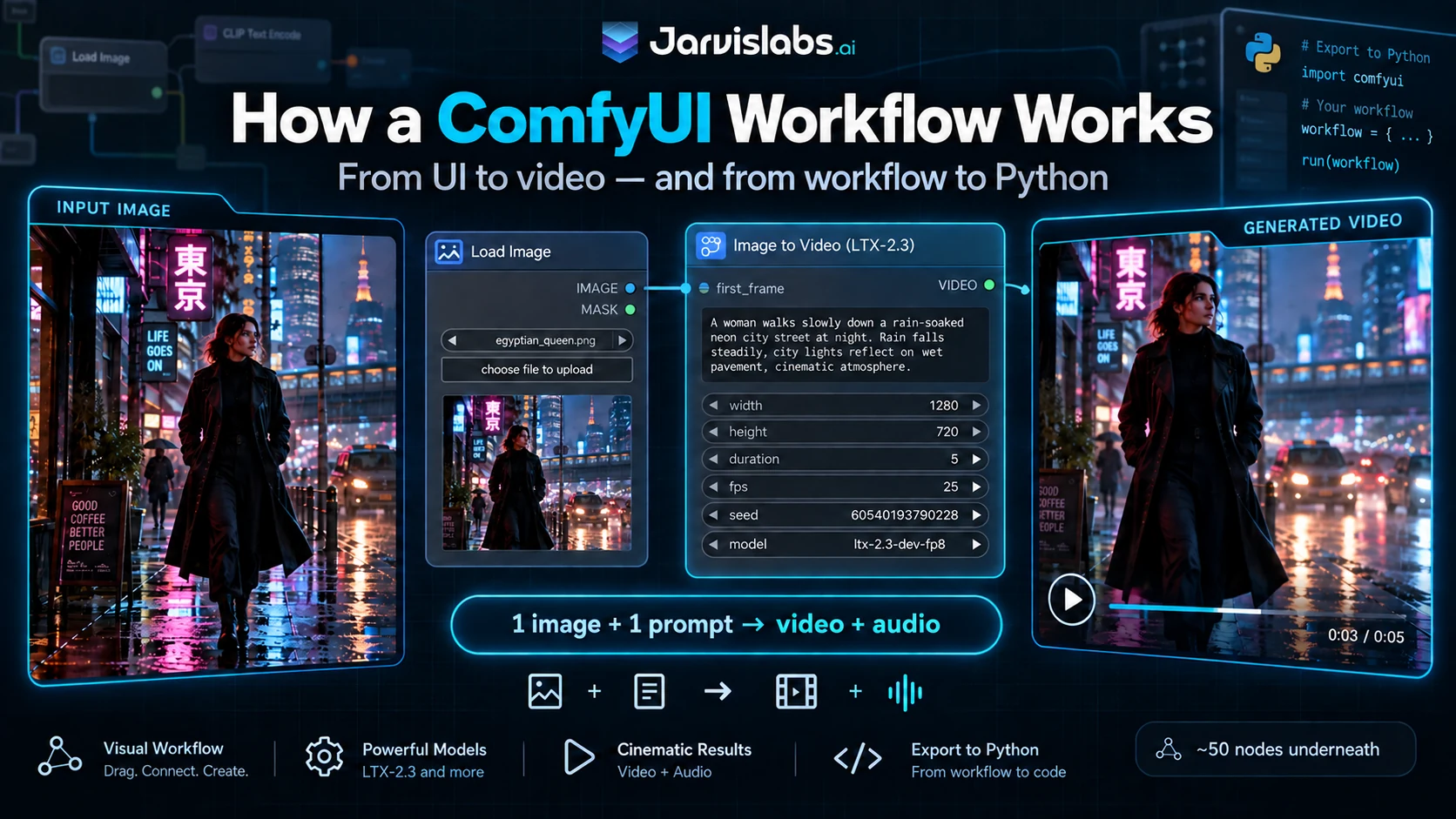
Open ComfyUI's LTX-2.3 template and you are looking at fifty nodes. Nine of them are yours to change, and the rest is wiring. This is how to tell them apart, and how to run the whole thing from Python once you want to.
Do not worry about the fifty nodes
You see four boxes. Two of them load your image and save the video, one is a sticky note, and the fourth is the workflow folded up.
ComfyUI calls that fourth box a subgraph. Think of it as a folder: one box standing in for a whole diagram underneath. Click into it and the fifty nodes appear.
That number is what makes people close the tab, and it should not. Eight of the fifty are things you would ever change. A ninth, your input image, sits outside the folder. The other forty-two are plumbing that works as shipped.
Click the middle node below to open the folder, and drag to move around. Switch to the API export to see the same graph flattened into the form the server executes.
API export flattens the subgraph. Nodes from inside the folder keep their number with the folder's in front: 319 becomes 320:319.
workflow-ui.json and workflow-api.json.Getting the workflow ready
Two things have to be in place before Run does anything.
Your image. Drag it onto the LoadImage node and the browser uploads it to the server. Everything the workflow touches lives under one directory:
/home/ComfyUI/input/     your uploads
/home/ComfyUI/output/    everything the workflow saves
/home/ComfyUI/models/    the weights
On a Jarvislabs instance /home is your volume, so those survive a pause and resume. Anything written outside them does not.
The models. A workflow stores the names of the models it needs, not the models. Open the template on a fresh machine and ComfyUI lists what is missing before it will run anything.
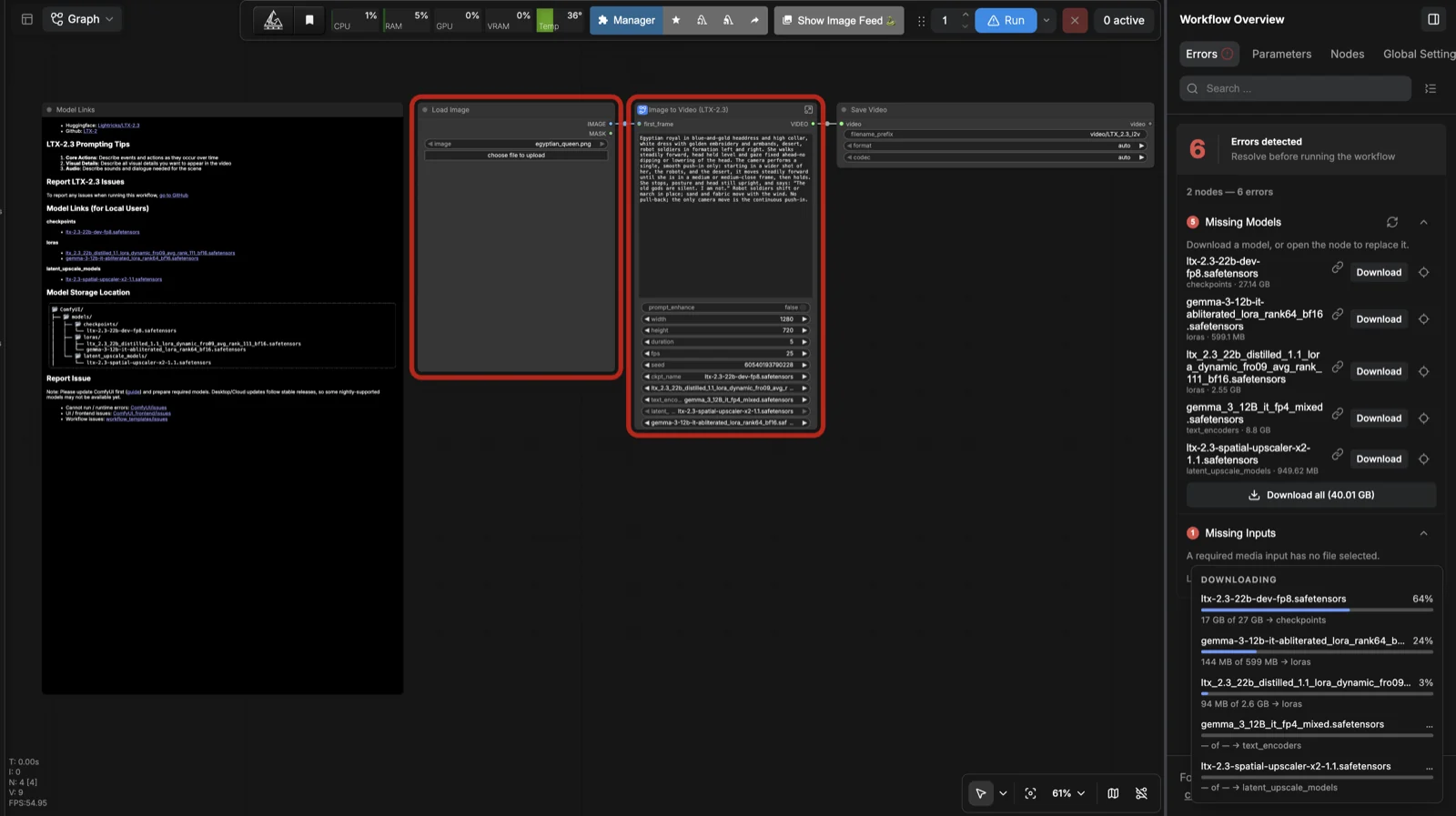
Five files, 42.96 GB, most of it one 29 GB checkpoint. They land on your volume, so you pay this once.
| File | Size | What it is for |
|---|---|---|
ltx-2.3-22b-dev-fp8 | 29.15 GB | The main model. Turns noise into a picture and a soundtrack. |
gemma_3_12B_it_fp4_mixed | 9.45 GB | Reads your prompt and turns it into something the model understands. |
ltx_2.3_22b_distilled_1.1_lora | 2.74 GB | Makes it fast. Half a minute instead of several. |
ltx-2.3-spatial-upscaler-x2-1.1 | 1.00 GB | Generates at half size and doubles it, which is cheaper than making it big from the start. |
gemma-3-12b-it-abliterated_lora | 0.63 GB | Adjusts how the prompt is read. We did not test what it changes. |
No third-party node packs are needed. Everything here ships with ComfyUI, so there is no afternoon of installing dependencies first.
That Download button is ours. In stock ComfyUI it is a normal download link, so the file lands on your laptop, not the GPU you are renting. On a Jarvislabs instance it downloads on the server, straight into
/home/ComfyUI/models.
The controls you actually change
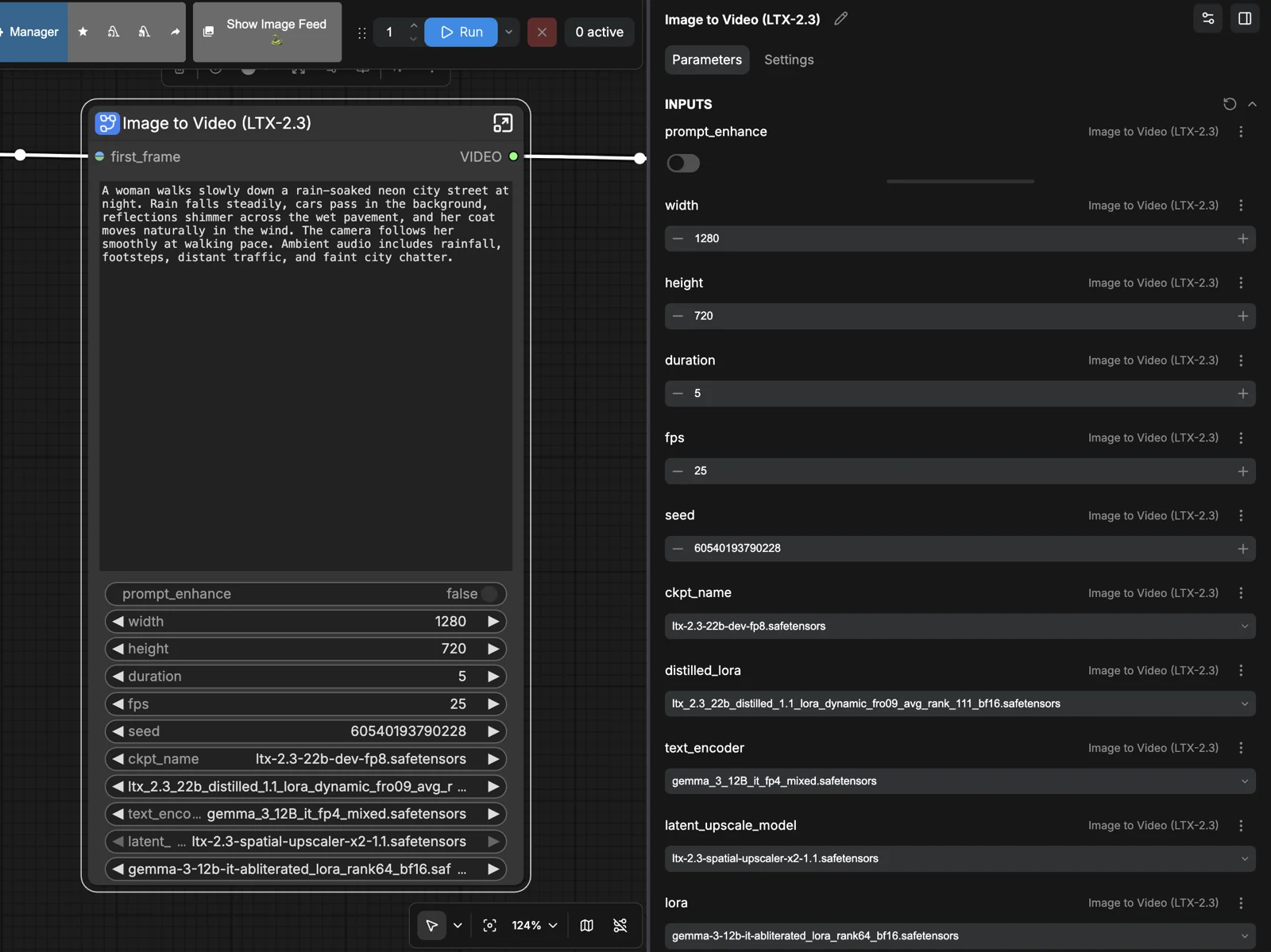
The Parameters panel gathers the controls that matter in one place, by name, so you never go hunting inside the graph.
| Control | What it does |
|---|---|
| prompt | One text box, describing the picture and the sound. There is no separate audio field. |
| width / height | What you expect, with a catch worth knowing about below. |
| duration / fps | Seconds and frames per second. You do not set a frame count; the graph multiplies these. |
| seed 1 | Decides the starting noise. Same seed and same settings gives the same video. |
| seed 2 | The workflow denoises twice, so there are two. This one is fixed at 42 and not on screen. It still changes your output, because the second pass re-noises the picture to 85% before cleaning it up again. |
| prompt enhance | Rewrites your prompt before the model sees it. We left it off, so everything here came from the sentence as typed. |
Your input image is the ninth. Everything else in the graph is there to move data between these.
What happens when you press Run
your image  +  your prompt
        |
        v
  LTX builds picture and sound together, as one thing
        |
        v
  a second pass refines it, and doubles the size
        |
        v
  an MP4 in /home/ComfyUI/output
That is the whole shape of it. The forty-two nodes you are ignoring handle the steps between those stages.
Our first run took 36.16 seconds, most of it the five models loading off disk rather than anything being generated. At the H200 rate at Jarvislabs that is about six cents. The models stay loaded afterwards, so the next video takes 14.38 seconds.
This is what came out of it: one photograph in, five seconds of video out.

The audio is worth one more line, because it surprises people. There is no separate audio model and no separate audio step. The same model builds the picture and the sound together, in one pass, from the same sentence.
Why your size changed, and why your video did not
You will not get the size you asked for. The model does not work in pixels. It works on a grid, where one square is 32×32 pixels and eight frames of time, and half a square does not exist. Your numbers round down to whole squares.
width    1280 ÷ 32        = 40     ->  40 squares  ->  1280, unchanged
height   720 ÷ 32         = 22.5   ->  22 squares  ->  704 pixels
frames   5 s × 25 fps + 1 = 126    ->  15 squares  ->  121 frames

asked for   1280×720, 5.00 s   ->   got   1280×704, 4.84 s
Nothing on screen mentions it. Most latent video models do some version of this, so the habit transfers.
Run it twice unchanged and you get the same video back. ComfyUI caches per node. If your graph matches one that already ran, nothing is generated — you get the earlier file back. /history reports how many nodes were skipped, under execution_cached.
what you change     it takes   and you get back
nothing              4.02 s    the same video
seed 2              10.03 s    same take, different finish
seed 1              14.38 s    a different video
prompt              16.04 s    a different video
input image         16.04 s    a different video
Building a re-roll button? Change seed 1. It picks the starting noise, so you get a genuinely different video. Seed 2 only re-rolls the refinement pass, which is the same take with a different finish. Change neither and nothing is generated at all: the cache hands back the previous video, and your user files a bug that is not one.
Running it from code
Everything so far went through the browser. To drive it from Python you need the version the server runs. ComfyUI calls that the API export, and it is under Graph → Export (API). If the docs send you to File → Export Workflow (API), ours was under Graph.
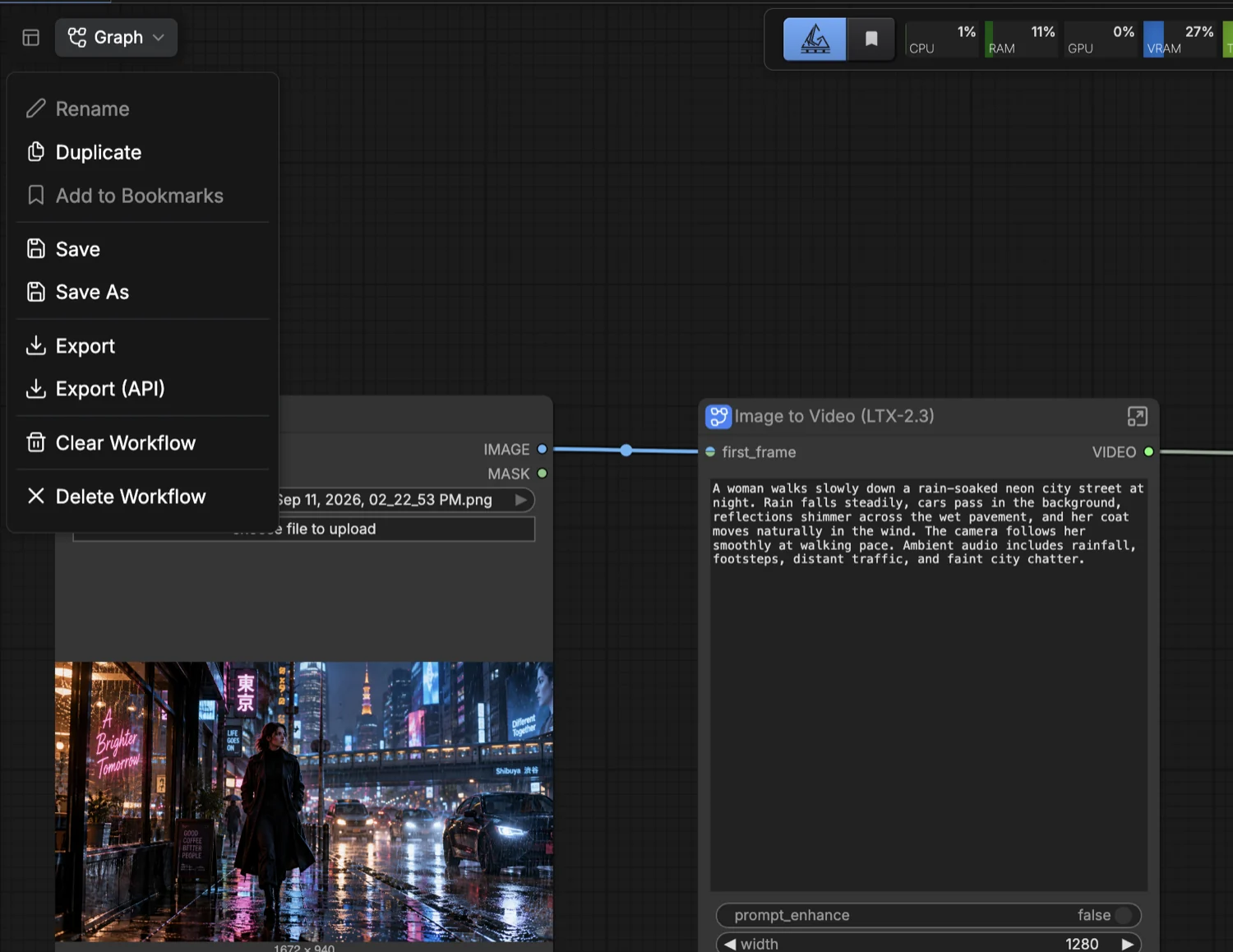
Graph → Export (API). The one next to it, plain Export, gives you the visual file instead.
It is the same workflow with everything the editor needed to draw it removed: positions, colours, notes, the subgraph boundary. That is 134 KB down to 14 KB. One of them you will want back.
The names do not survive. The editor knows that control is called
prompt. The export calls it320:319, and nothing in that string tells you what it is. So do not hand the raw export to your application. Treat it as a template, and keep a small map from readable names to ids beside it.
prompt  ->  320:319
width   ->  320:312
height  ->  320:299
image   ->  269
Those are ours. To find yours: type something distinctive into a control, export, and search the JSON for it. Each control lands on exactly one node.
Four endpoints do everything. That block is also the whole spec, so hand it to an assistant if you would rather not write the client yourself.
POST /upload/image      returns the name the server stored
POST /prompt            the api-format graph; returns a prompt_id
GET  /history/{id}      empty until the job finishes, then holds the outputs
GET  /view              the bytes, by filename + subfolder + type
One thing first. 127.0.0.1:6006 means the ComfyUI on your machine. If Python is on your laptop and ComfyUI is on a rented GPU, forward the port and it becomes true:
ssh -N -L 6006:127.0.0.1:6006 root@<instance-ip>import json, time, urllib.request, urllib.parse
BASE = "http://127.0.0.1:6006"
def submit(graph): # POST /prompt
r = urllib.request.Request(f"{BASE}/prompt", method="POST",
data=json.dumps({"prompt": graph}).encode(),
headers={"Content-Type": "application/json"})
return json.load(urllib.request.urlopen(r, timeout=60))["prompt_id"]
def wait(pid, timeout=900): # GET /history/{id}
end = time.time() + timeout
while time.time() < end: # empty means "not finished", not "error"
h = json.load(urllib.request.urlopen(f"{BASE}/history/{pid}", timeout=30))
if pid in h:
if h[pid].get("status", {}).get("status_str") == "error":
raise RuntimeError(h[pid]["status"])
return h[pid]
time.sleep(1)
raise TimeoutError(pid)
def download(f, dest): # GET /view
q = urllib.parse.urlencode({"filename": f["filename"],
"subfolder": f.get("subfolder", ""),
"type": f.get("type", "output")})
with urllib.request.urlopen(f"{BASE}/view?{q}", timeout=300) as r:
open(dest, "wb").write(r.read())name = upload("input.png") # use the name it returns
graph = build(image=name, prompt="...", # always set both seeds
seed_1=60540193790228, seed_2=42) # yourself, never inherit
download(next(outputs(wait(submit(graph)))), "out.mp4")Use the filename the server returns, not the one you sent. If that name already exists with different content, ComfyUI saves yours as
input (1).png. Use your own name and you run the old image.
You should not have to do any of this. We are building it into Jarvislabs: save a workflow, name its inputs, call it.
POST /v1/deployments/{id}/run
{"prompt": "a rain-soaked neon street", "seed": 42}
No template, no node ids. It is a prototype today. Tell us if you want it — [email protected]. That is how we decide what to finish first.
Where to go from here
Open the template, drop in an image, type a sentence and press Run. That is genuinely the whole thing, and the nine controls above are all you need to touch.
One caveat. Our instance ran a fork, feature/av_inference@a6994ed1, not stock ComfyUI. If something behaves differently for you, that is the first place to look.
You can launch a ComfyUI instance on Jarvislabs with the image and the model store already attached, and pause it when you are not using it.
Frequently Asked Questions About ComfyUI Workflows
How many nodes in a ComfyUI workflow do I actually need to understand?
Far fewer than the graph suggests. ComfyUI's LTX-2.3 image-to-video template shows four boxes, one of which is a subgraph holding fifty nodes. Of those fifty, eight are settings you would ever change — prompt, width, height, duration, frame rate, two seeds and one toggle — plus your input image, which sits outside the subgraph. The other forty-two are models, samplers and wiring that work as shipped and should be left alone.
Why does ComfyUI return a different resolution than the one I requested?
Because the model works on a latent grid, not on pixels. For LTX-2.3 one grid square covers 32×32 pixels and eight frames of time, and a partial square does not exist, so your numbers round down to whole squares. Ask for 1280×720 at five seconds and you get 1280×704 at 4.84 seconds: 720 ÷ 32 is 22.5, which floors to 22 squares and 704 pixels. Nothing in the interface warns you. Most latent video models do some version of this.
Why does ComfyUI return the same video when I press Run again?
ComfyUI caches per node. If the graph you submit matches one that already ran, it does not generate anything — it hands back the file it made last time, and /history reports the skipped nodes under execution_cached. An unchanged re-run comes back in about 4 seconds instead of 14. If you are building a re-roll button, it has to change the content seed, or your users will report a bug that is not one.
Does ComfyUI's API export keep the parameter names?
No. The visual workflow stores a readable label next to each promoted control, but the API export keeps only what the server needs to execute. A control the editor calls prompt becomes the key 320:319, and nothing in that string identifies it. Searching the exported file for duration or first_frame finds nothing. Treat the export as an execution template and keep your own map from readable names to node ids beside it.
Do I need extra models to get audio out of LTX-2.3?
No. There is no separate audio model and no separate audio-generation step. LTX-2.3's audio decoder points at the same 29 GB checkpoint the video path already uses, so picture and sound are built together in one pass from the same prompt. LTX 2.5 ships a separate audio decoder; 2.3 does not. The file list gives you no way to work that out — you find it by opening the graph.
Get Started
Build & Deploy Your AI in Minutes
Cloud GPU infrastructure designed specifically for AI development. Start training and deploying models today.
View Pricing